


A virtual mailbox for remote businesses solves a problem that remote work never removed: physical mail still arrives, and nobody is sitting at an office desk to open it. Remote work did not disappear after the pandemic, but it did change shape. According to LinkedIn Economic Graph data, about 9% of US paid job postings offered remote work in July 2023, down from roughly 18% a year earlier. Even so, remote roles kept drawing a large share of applicants: in August 2023 they attracted 43.7% of applications. LinkedIn’s September 2024 report on remote and hybrid work found that hybrid arrangements remain dominant, while small companies in the US, UK and Germany still show growth in remote roles.
The lesson is not that remote work is over. It has settled into a mix of fully remote companies, hybrid teams and small distributed businesses. All of them share one practical problem: letters, contracts and parcels still need to be received somewhere. That is where a virtual mailbox for remote businesses comes in. Whichever of the best online business models for beginners you choose, handling mail without a fixed office is a problem you will meet sooner or later.
This guide explains what a virtual mailbox is, the seven main benefits, how it compares with a PO box and a registered agent, what it costs, and how to set one up step by step. It also covers the mistakes to avoid, so you can choose a provider with confidence.
What Is a Virtual Mailbox for Remote Businesses?
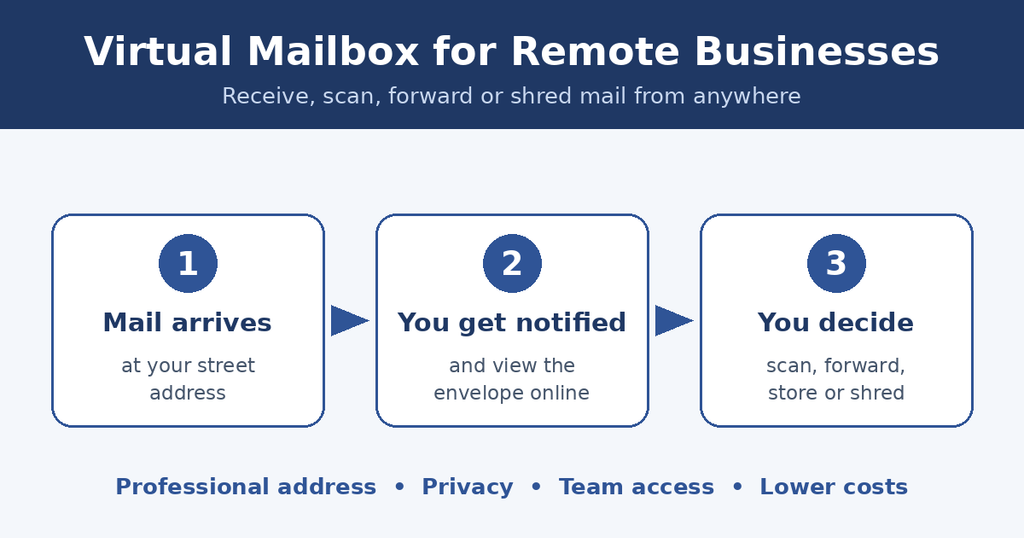
A virtual mailbox is a service that gives you a real street address, receives your physical mail and parcels on your behalf, and lets you manage everything from an online dashboard or app. When an item arrives, the provider records it, usually with a photo of the envelope, and notifies you. You then decide what happens next: open and scan it, forward it, store it or shred it.
In short, a virtual mailbox for remote businesses turns paper mail into something you can handle from a laptop or phone, wherever your team happens to be. Providers that serve US customers are generally classed as commercial mail receiving agencies (CMRAs), which matters for the paperwork covered later in this guide.
1. Simplifying Mail Management
Running a business without a fixed office makes physical mail a logistical headache. A virtual mailbox for remote businesses gives you a street address where a provider receives your mail, notifies you when something arrives, and lets you decide what happens next. You can view the envelope online, ask for the contents to be scanned, have items forwarded, or have them shredded. Some providers also offer check deposits.
This removes the need for a team member to collect, sort and forward mail by hand. It also lowers the risk of letters piling up unnoticed or going missing. For teams spread across time zones, a shared online dashboard means anyone authorized can act on an important document without waiting for one person to come back to the office.
How does a virtual mailbox handle mail from multiple sources?
Because a virtual address is a real street address rather than a PO box, it can typically accept letters from USPS as well as parcels from carriers such as FedEx, UPS and DHL. Everything is logged in one online account, so you do not need to track several delivery services separately. You can also ask the provider to open urgent mail and send you a scan.
2. Supporting Operational Flexibility
A virtual mailbox keeps your business connected no matter where your team members are. Anyone with access can check incoming correspondence from a laptop or phone, which keeps the team aligned and responsive. Many providers add virtual mailbox services with mail scanning and package forwarding, and some support check deposits, so day-to-day admin does not depend on someone being in a particular city.
This flexibility matters during travel, relocation or an unexpected disruption, when a physical mailbox would simply sit unattended. It is one small but concrete piece of a wider digital business strategy for entrepreneurs: reducing the number of tasks that need a person in a specific place. That is exactly why a virtual mailbox for remote businesses fits so well into a location-independent way of working.
3. Building a Professional Business Address
Trust is hard to earn. PwC’s 2024 Trust Survey found that 90% of business executives believe customers highly trust their companies, while only 30% of consumers say they do. That 60 percentage point gap is wider than the 57 points recorded in both 2023 and 2022.
A professional business address will not close that gap on its own, but it is one visible signal of legitimacy. Using a home address on invoices, websites and marketing materials can look informal and exposes personal details. A virtual mailbox for remote businesses gives you a street address that you can use in those places instead. If you are still working out how to start an online business from scratch, a business address is one of the first practical details worth settling, because it appears on almost everything you publish. Credibility also supports any customer acquisition strategy for an online business, since visitors are more likely to buy from a company that looks established and reachable.
Are virtual mailbox addresses acceptable for registering a business?
Sometimes, but not always, so check before you rely on one. In the United States, virtual mailbox providers are classed as commercial mail receiving agencies (CMRAs). To use one, you must complete USPS Form 1583, which is notarized and requires two forms of ID. A virtual mailbox is also not the same as a registered agent: a registered agent is a person or company designated to receive legal documents, and the rules come from your state. Some banks and licensing offices may not accept a CMRA address as your only address. Rules differ outside the US, so confirm with the relevant registry or your provider before using the address for a formal filing.
4. Protecting Privacy and Security
Privacy is a real concern for remote businesses run from home. Publishing a personal address exposes sensitive information to clients, vendors and anyone who searches for your company. With a virtual mailbox for remote businesses, you can protect your home address by using the provider’s address for business correspondence instead. Note that some official filings may still require a physical address, so check what each one asks for.
A virtual mailbox for remote businesses can also reduce the chance of mail being lost or stolen from an unattended home mailbox or doorstep. Many providers offer secure scanning and shredding for sensitive documents such as contracts, financial statements and legal letters. Reputable providers typically open mail only when you ask them to, but handling practices and security measures differ, so read the provider’s terms before you sign up.
How do virtual mailboxes protect sensitive information?
You control what happens to each item: leave it sealed, request a scan, forward it, or ask for it to be shredded. Access to your account should be limited to authorized users, and strong passwords and two-factor authentication add another layer. Always confirm how a provider stores scans and who on their staff can view your mail.
5. Supporting International Expansion
One advantage of running a remote business is the ability to reach new markets without relocating. Many providers offer addresses in multiple cities and countries, and some list well over 2,000 locations worldwide. A local-looking address can help customers and partners feel more comfortable and simplify receiving documents and parcels.
Two cautions apply. A mailing address does not by itself create a legal presence, tax registration or permission to trade in another country, so check local requirements first. And you should confirm what the provider can do with international parcels. When expansion is planned carefully, it connects naturally to the question of how to scale an online business without losing profitability, because a low-cost address is far cheaper than leasing an office in each new market, although exact savings depend on the city and provider.
6. Cutting Overhead Costs
A traditional office means rent, utilities, furniture, insurance and often a long lease. For a small team that works from home, most of that spending buys very little. A virtual mailbox for remote businesses covers the one thing an office still provides to a remote team, which is a place where mail can be received, and it does so at a fraction of the cost.
You also avoid paying someone’s time to collect, sort and forward mail, and it is easier to upgrade, downgrade or cancel than to exit a lease. Keep in mind that the monthly fee is only part of the picture, because scan limits, forwarding charges and extras can add up. The cost section below shows what to compare.
7. Better Record-Keeping and Faster Response
Scanned mail arrives as a digital file. You can save it to a shared cloud folder, send it to your accountant, search for it by sender or date, and keep it for audits. Paper letters stuffed in a drawer are easy to lose and hard to search.
Speed matters too. Tax notices, bank letters, invoices and legal correspondence often come with deadlines, and being notified the day an item arrives gives you time to respond. Check how long the provider keeps your scans and whether you can export them, and keep your own backup of anything important.
Virtual Mailbox vs PO Box vs Registered Agent vs Coworking Space
These options are often confused, but they do different jobs. A virtual mailbox for remote businesses is built for receiving and managing everyday mail and parcels, while a registered agent exists to receive legal documents on behalf of your company. The table below shows where each one fits.
| Option | What it does | Street address? | Best for |
|---|---|---|---|
| Virtual mailbox | Receives mail and parcels; you scan, forward, store or shred online | Yes, usually | Remote teams and founders who want a street address and online mail control |
| PO box | A locked box at a post office; you collect mail in person or have it forwarded | No | Basic mail collection if you live near the post office |
| Registered agent | Receives legal and government documents for your company | Yes, a business address in your state | Meeting state legal requirements; not a general mail service |
| Coworking or office space | A desk or office, often with mail handling included | Yes | Teams that also need meeting space or a place to work in person |
Who Should Use a Virtual Mailbox for Remote Businesses?
A virtual mailbox is most useful when your business receives physical mail but has nobody in a fixed location to handle it. Typical users include:
- Solo founders and freelancers who work from home and want to keep their personal address private.
- Fully remote startups with team members in different cities or countries.
- E-commerce and online service businesses that receive supplier letters, returns, contracts and bank correspondence.
- Digital nomads and frequent travelers who are rarely in one place long enough to collect mail.
- Small businesses entering a new city or country that want a local-looking address.
If your business almost never receives paper mail and everything is handled by email and online portals, you may not need one yet. For everyone else, the time saved and the privacy gained usually justify the cost.
How to Set Up a Virtual Mailbox for Remote Businesses Step by Step
- List what you need. Decide whether you need scanning, forwarding, parcel acceptance, check deposits, several users or addresses in more than one location.
- Shortlist providers. If you are in the US, confirm the provider is a registered CMRA, then compare scan limits, forwarding fees, storage rules and cancellation terms.
- Check address acceptance. Ask your bank, state filing office and any licensing body whether they accept a CMRA address before you rely on it.
- Complete USPS Form 1583. The form must be notarized and needs two forms of ID. Many providers explain the process or offer online notarization, so ask what they support.
- Update your public address. Add the new address to your website, invoices, email signature and business profiles. For official records, follow each institution’s own process instead of assuming the address will be accepted.
- Configure your account. Add authorized users, turn on two-factor authentication and set your preferences for notifications, shredding and forwarding.
- Build a routine. Review incoming mail on set days, file important scans in a clearly named folder and keep a backup of key documents.
How Much Does a Virtual Mailbox for Remote Businesses Cost?
Prices vary by provider, location and the services you need. At the time of writing, some basic plans start at around $10 per month, while business-focused plans from some providers start at around $49 per month when billed annually. Prices change often, so check the current rates on the provider’s website.
What affects the total cost:
- Number of scans: many plans include a set number of scans, with extra scans billed separately.
- Forwarding and shipping: postage and handling fees are usually charged on top.
- Storage and shredding: some providers charge for long-term storage or bulk shredding.
- Extras: check deposits, registered agent service and multiple users can raise the price.
- Location: addresses in major cities often cost more than those in smaller ones.
What to Check Before Choosing a Provider
Not every provider suits every business, so use this checklist to compare options before you commit to a virtual mailbox for remote businesses.
- USPS-registered CMRA: if you are in the US, confirm the provider is registered and explains its Form 1583 process.
- Address acceptance: ask whether the address will be accepted by your bank, state and any licensing body you deal with.
- Mail handling: check how fast items are scanned, how long mail is stored and what is charged for forwarding.
- Security: look for account protection such as two-factor authentication, and a clear privacy policy.
- Fees: compare scan limits, overage charges and cancellation terms, not just the headline monthly price.
- Registered agent needs: if you need one, treat it as a separate service even when the same company offers both.
Common Mistakes to Avoid
Most problems with a virtual mailbox for remote businesses come from skipped checks rather than from the service itself. Watch out for these:
- Assuming the address works everywhere. Banks, licensing offices and some registries may refuse a CMRA address, so confirm first.
- Confusing a mailbox with a registered agent. They are separate services with different legal roles.
- Choosing on the headline price alone. Scan limits, forwarding and storage fees can change the real cost.
- Skipping or rushing Form 1583. Incomplete paperwork or ID can delay your account or stop mail from being delivered.
- Sharing one login. Give each team member their own access so you can control and review who does what.
- Ignoring the privacy terms. Check how scans are stored, how long they are kept and who can view your mail.
- Forgetting to back up scans. Save important documents in your own cloud storage instead of relying only on the provider.
Conclusion
A virtual mailbox for remote businesses gives you a practical way to receive and manage physical mail without a traditional office. It simplifies daily admin, keeps personal addresses private, lowers overhead and supports a more professional image. Used with a clear understanding of USPS rules, local registration requirements and each provider’s terms, it can help a remote business stay organized, secure and credible as it grows.
Frequently Asked Questions (FAQs)
What is a virtual mailbox for remote businesses?
A virtual mailbox is a service that receives your physical mail at a street address and lets you view, scan, forward or shred it online from anywhere.
How do virtual mailboxes benefit remote businesses?
They simplify mail management, help keep a home address private, provide a professional business address, reduce overhead and give your team access to important documents from any location.
Can a virtual mailbox be used as a business address?
Often yes for marketing materials, invoices and general correspondence. For official registration, banking or licensing, acceptance depends on the institution and local rules, so confirm in advance. A virtual mailbox is also not a registered agent.
Are virtual mailboxes safe for business documents?
Reputable providers offer secure handling, scanning, restricted access and shredding. Security practices vary, so review each provider’s privacy policy and account protections before you commit.
Can virtual mailboxes help businesses expand internationally?
They can provide addresses in different cities and countries, which helps you receive mail and appear local. They do not replace legal registration, tax or licensing requirements in those markets.
How much does a virtual mailbox cost?
Basic plans can start at around $10 per month, and business-focused plans from some providers start at around $49 per month when billed annually. The final price depends on the location, the number of scans, forwarding fees and extra services such as check deposits.
Is a virtual mailbox the same as a PO box?
No. A PO box is a locked box at a post office, and many couriers will not deliver to it. A virtual mailbox uses a street address, can accept parcels from carriers, and lets you manage mail online instead of collecting it in person.
Do I need USPS Form 1583 for a virtual mailbox?
In the United States, yes. Because providers are CMRAs, you must complete Form 1583, have it notarized and provide two forms of ID before the provider can handle your mail.