

Introduction
If you want your website to rank higher on Google, attract more organic traffic, and provide a better experience for visitors, On-Page SEO is one of the most important strategies to master. Whether you run a business website, blog, eCommerce store, or portfolio, optimizing your webpages helps search engines understand your content and match it with users’ search queries.
Many website owners focus on publishing content but overlook the factors that determine whether that content can actually rank. This On-Page SEO vs Off-Page SEO Complete Guide 2026 explains why even a well-written article may struggle to appear in search results if its title tags, headings, internal links, images, page speed, or user experience are poorly optimized. On-Page SEO ensures that every element of a webpage works together to improve visibility, relevance, and higher search engine rankings.
This comprehensive guide explains everything you need to know about On-Page SEO, including its importance, core optimization elements, best practices, and practical techniques that can help improve your search rankings in 2026. Whether you’re a beginner or an experienced marketer, you’ll learn actionable strategies to optimize every page of your website.
On-Page SEO Overview
| Feature | Details |
| SEO Type | On-Page (Onsite) SEO |
| Focus | Optimizing elements within a website |
| Main Goal | Improve relevance, user experience, and search rankings |
| Controlled By | Website owner or administrator |
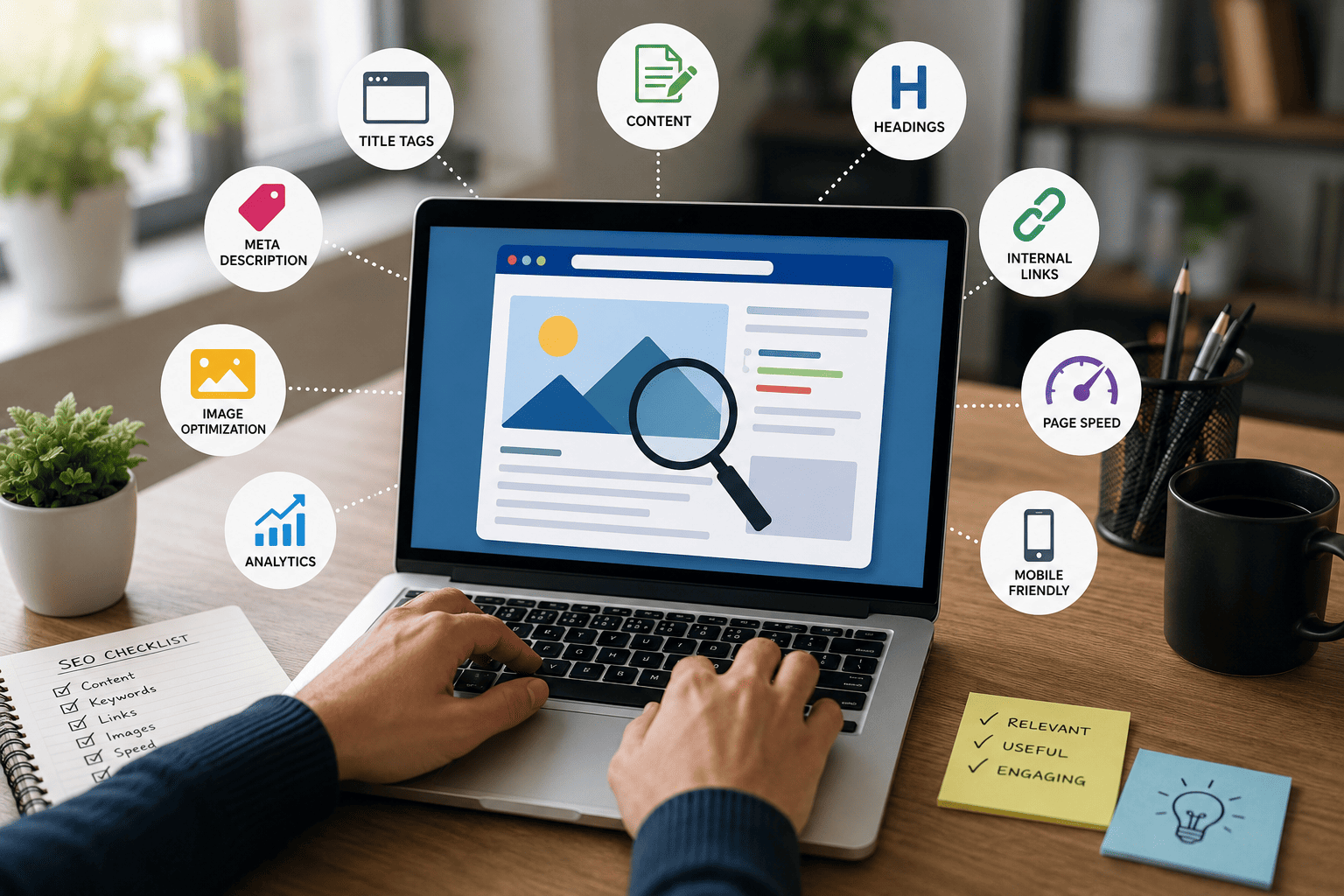
| Key Elements | Content, title tags, meta descriptions, headings, URLs, images, internal links, page speed |
| Ranking Benefits | Higher visibility, better keyword rankings, improved click-through rate |
| User Benefits | Better readability, faster loading, easier navigation |
| Difficulty Level | Beginner to Advanced |
| Time to See Results | Usually within a few weeks to a few months |
| Best For | Blogs, business websites, eCommerce stores, news sites, and portfolios |
Quick Answer
On-Page SEO is the process of optimizing the content and HTML elements of individual webpages to help search engines understand them better and improve their rankings in search results. It includes optimizing high-quality content, title tags, meta descriptions, headings, URLs, images, internal links, page speed, mobile responsiveness, and overall user experience.
Unlike Off-Page SEO, which focuses on building authority through backlinks and external signals, On-Page SEO gives you complete control over your website’s optimization. By implementing On-Page SEO best practices, you can make your pages more relevant to users’ search intent, increase organic traffic, and improve conversion rates over time.
A Technical SEO Checklist for Better Website Rankings helps build a strong website foundation. Even the best content may not rank well if technical issues like slow speed, crawl errors, or poor indexing are not fixed.
What is On-Page SEO?
Understanding On-Page SEO
On-Page SEO (also called Onsite SEO) refers to all optimization activities performed directly on your website to improve its visibility in search engines and enhance the user experience.
These optimizations help search engines understand:
- What your webpage is about
- Which keywords it targets
- Whether the content satisfies user intent
- How valuable the page is compared to competing pages
- Whether visitors can easily navigate and interact with the content
Unlike Off-Page SEO, which depends on external factors such as backlinks and brand mentions, On-Page SEO is entirely under your control. Every improvement you make—whether updating your content, optimizing images, or improving page speed—can contribute to better rankings and a better experience for visitors.
Why Is On-Page SEO Important?
Search engines aim to provide users with the most relevant and helpful results. If your webpage is well-optimized, it becomes easier for search engines to crawl, understand, and index your content.
A strong On-Page SEO strategy can help you:
- Improve keyword rankings
- Increase organic website traffic
- Enhance user experience
- Reduce bounce rates
- Improve page loading speed
- Increase click-through rates (CTR)
- Boost conversions and sales
- Help search engines crawl your website more efficiently
- Strengthen your website’s overall SEO performance
Without proper On-Page optimization, even high-quality content may struggle to compete with better-optimized pages.
How Search Engines Use On-Page SEO
When Google crawls a webpage, it analyzes multiple elements before deciding where it should rank. These include:
- Content quality and originality
- Keyword relevance
- Title tags
- Meta descriptions
- Heading structure (H1–H6)
- URL structure
- Internal linking
- Image optimization
- Mobile usability
- Core Web Vitals
- Overall page experience
Each of these signals helps search engines determine whether your page deserves a higher position in search results.
Benefits of On-Page SEO
Effective On-Page SEO provides advantages for both search engines and users.
For Search Engines
- Easier crawling and indexing
- Better understanding of page topics
- Improved keyword relevance
- Stronger website structure
For Website Owners
- Higher search rankings
- Increased organic traffic
- Better engagement
- More leads and conversions
- Improved long-term SEO performance
For Users
- Faster page loading
- Easy navig
Essential Elements of On-Page SEO
On-Page SEO consists of multiple optimization factors that work together to improve a webpage’s visibility, usability, and relevance. While no single element guarantees higher rankings, combining these best practices creates a strong foundation for long-term SEO success.
1. High-Quality Content
Content is the backbone of On-Page SEO. Search engines prioritize pages that provide accurate, original, and valuable information that satisfies the user’s search intent.
Your content should:
- Answer the user’s question completely.
- Be well-researched and factually accurate.
- Offer unique insights instead of copying competitors.
- Be easy to read with short paragraphs and clear formatting.
- Stay updated as information changes.
Best Practices
- Focus on solving real problems.
- Use your primary keyword naturally.
- Include related keywords where relevant.
- Add statistics, examples, or visuals to improve credibility.
- Update older articles regularly.
2. Title Tag Optimization
The title tag is one of the strongest On-Page SEO signals. It tells both users and search engines what the page is about.
Example
Good Title:
On-Page SEO: Complete Beginner’s Guide to Higher Google Rankings (2026)
Best Practices
- Include your primary keyword near the beginning.
- Keep the title under 60 characters when possible.
- Write a compelling title that encourages clicks.
- Avoid keyword stuffing.
- Make every title unique.
3. Meta Description
A meta description is the short summary displayed below your page title in search results. While it isn’t a direct ranking factor, it plays an important role in improving click-through rates (CTR).
A Good Meta Description Should:
- Include the primary keyword naturally.
- Clearly explain what users will learn.
- Be engaging and action-oriented.
- Stay between 150–160 characters.
Example
Learn what On-Page SEO is, why it matters, and how to optimize your website with proven strategies to improve rankings, traffic, and user experience.
4. Header Tags (H1, H2, H3, H4)
Headings organize your content and make it easier for both readers and search engines to understand your page structure.
Proper Heading Structure
- H1: Main page title (used once)
- H2: Major sections
- H3: Subsections
- H4: Supporting details when needed
Benefits
- Improves readability.
- Helps Google understand content hierarchy.
- Increases the chances of appearing in featured snippets.
5. URL Optimization
A clean, descriptive URL is easier for users to understand and helps search engines identify the topic of a page.
Good URL
example.com/on-page-seo
Poor URL
example.com/post?id=4578
Best Practices
- Keep URLs short and descriptive.
- Include the primary keyword.
- Use hyphens (-) instead of underscores (_).
- Avoid unnecessary numbers or symbols.
6. Internal Linking
Internal links connect one page of your website to another. They improve navigation, distribute authority across your site, and help search engines discover new content.
Benefits
- Better crawling and indexing.
- Improved user experience.
- Increased page authority.
- Longer session duration.
- Reduced bounce rate.
Example
If you’re writing about keyword research, link naturally to related articles such as:
- Technical SEO
- Keyword Research
- SEO Audit
- Content Marketing
- Off-Page SEO
7. Image Optimization
Images make content more engaging, but unoptimized images can slow down your website.
Optimize Every Image
- Compress file sizes.
- Use descriptive filenames.
- Add keyword-rich alt text.
- Choose modern formats like WebP where possible.
- Make images responsive.
Example
Bad Filename
IMG00254.jpg
Good Filename
on-page-seo-checklist.webp
8. Page Speed Optimization
Website speed directly impacts user experience and search rankings. Slow-loading pages increase bounce rates and reduce conversions.
Ways to Improve Speed
- Compress images.
- Enable browser caching.
- Minify CSS and JavaScript.
- Use a Content Delivery Network (CDN).
- Remove unnecessary plugins and scripts.
- Enable lazy loading for images.
Benefits
- Better rankings.
- Higher user satisfaction.
- Increased conversions.
- Lower bounce rates.
9. Mobile-Friendly Design
Google uses mobile-first indexing, meaning it primarily evaluates the mobile version of your website for ranking purposes.
Your Website Should
- Load quickly on mobile devices.
- Adapt to all screen sizes.
- Use readable fonts.
- Include touch-friendly buttons.
- Avoid intrusive pop-ups.
Why It Matters
A responsive website provides a better experience for users and performs better in search results.
10. User Experience (UX)
Search engines reward websites that offer a smooth and enjoyable browsing experience.
Improve UX By
- Creating clear navigation.
- Using short paragraphs.
- Adding bullet points.
- Including relevant images.
- Using sufficient white space.
- Making important information easy to find.
A positive user experience keeps visitors engaged, increases time on page, and encourages them to explore more of your website.
11. Keyword Optimization
Keywords help search engines understand your page’s topic, but they should always be used naturally.
Where to Include Your Primary Keyword
- Page title
- First paragraph
- H1 heading
- One or more H2 headings
- Meta description
- URL
- Image alt text
- Conclusion
Avoid
- Keyword stuffing.
- Repeating the same phrase unnaturally.
- Forcing keywords where they don’t fit.
Instead, use related terms and synonyms to keep your content natural and comprehensive.
12. Schema Markup (Structured Data)
Schema markup provides additional context to search engines, helping them understand your content more accurately.
Common schema types include:
- Article
- FAQ
- How-To
- Product
- Review
- Organization
- Breadcrumb
Benefits
- Rich results in search.
- Higher click-through rates.
- Improved search visibility.
- Better understanding of your content by search engines.
13. Core Web Vitals
Core Web Vitals measure the real-world performance of your webpages and are an important part of Google’s Page Experience signals.
The three key metrics are:
- Largest Contentful Paint (LCP): Measures loading performance.
- Interaction to Next Paint (INP): Measures responsiveness.
- Cumulative Layout Shift (CLS): Measures visual stability.
Improving these metrics helps create a faster, smoother experience for users while supporting better SEO performance.
Key Takeaway
Strong On-Page SEO isn’t about optimizing just one element—it’s about ensuring that every part of your webpage works together. High-quality content, optimized titles, descriptive URLs, fast loading speeds, mobile responsiveness, structured headings, internal links, and a great user experience all contribute to better search visibility and long-term organic growth.
In the next part, we’ll explore the benefits of On-Page SEO, a step-by-step optimization checklist, real-world examples, practical use cases, and proven best practices that you can apply to every webpage.
- ation
- High-quality, relevant content
- Better mobile experience
- Greater trust in your website
Zero-Click Searches Explained in 2026 highlights why modern SEO goes beyond traditional rankings. In the next section, we’ll explore the essential elements of On-Page SEO, including content optimization, title tags, meta descriptions, heading tags, URL optimization, internal linking, image SEO, page speed, mobile optimization, and user experience.
Benefits of On-Page SEO
Investing in On-Page SEO offers long-term advantages for your website, users, and overall digital marketing strategy. When every page is properly optimized, search engines can understand your content more effectively, while visitors enjoy a smoother browsing experience.
1. Higher Search Engine Rankings
Well-optimized pages are more likely to rank for relevant keywords because search engines can easily understand their content and purpose.
Benefits
- Better keyword visibility
- Improved ranking positions
- More opportunities to appear in featured snippets
2. Increased Organic Traffic
Higher rankings naturally lead to more clicks from search results. Since organic traffic is free, it provides long-term value without ongoing advertising costs.
Benefits
- More qualified visitors
- Sustainable traffic growth
- Lower customer acquisition costs
3. Better User Experience
On-Page SEO improves website usability by making content easier to read and navigate.
Examples include:
- Faster loading pages
- Mobile-friendly layouts
- Clear navigation
- Readable typography
- Well-organized headings
Happy visitors are more likely to stay longer and explore additional pages.
4. Higher Click-Through Rate (CTR)
An engaging title tag and compelling meta description encourage users to click your page instead of a competitor’s.
Optimizing these elements can significantly increase traffic, even without improving rankings.
5. Improved Website Authority
Although backlinks build authority externally, consistently publishing high-quality, optimized content helps establish your website as a trusted resource within your niche.
6. Better Conversion Rates
SEO isn’t just about attracting visitors—it also helps convert them into customers.
Optimized pages guide users toward actions such as:
- Purchasing products
- Filling out contact forms
- Subscribing to newsletters
- Downloading resources
How to Optimize a Page for On-Page SEO
Follow these steps whenever you publish a new webpage or update existing content.
Step 1: Perform Keyword Research
Identify:
- Primary keyword
- Secondary keywords
- Related search terms
- User search intent
Choose keywords that match what your audience is actually searching for.
Step 2: Create High-Quality Content
Your content should:
- Solve a problem
- Answer user questions
- Be original
- Provide value
- Cover the topic comprehensively
Focus on helping readers rather than simply inserting keywords.
Step 3: Optimize Your Title Tag
A strong title should:
- Include the primary keyword
- Be clear and descriptive
- Encourage clicks
- Stay within recommended length
Step 4: Write an Engaging Meta Description
Summarize the page in a way that encourages users to visit your website.
Remember:
- Include the keyword naturally.
- Explain the benefit.
- Add a call to action where appropriate.
Step 5: Structure Content with Headings
Use a logical hierarchy:
- H1 for the page title
- H2 for major sections
- H3 for supporting topics
This improves both readability and SEO.
Step 6: Optimize Images
Before uploading images:
- Compress the file size.
- Rename the file descriptively.
- Add meaningful alt text.
- Use responsive image formats.
Step 7: Add Internal Links
Connect your new page to relevant articles on your website.
Internal linking helps:
- Search engines crawl your site
- Visitors discover more content
- Spread authority across pages
Step 8: Improve Page Speed
A faster website creates a better experience for users and supports stronger search performance.
Regularly test your pages and optimize anything that slows them down.
Step 9: Check Mobile Responsiveness
Always verify that your page:
- Looks good on smartphones
- Loads quickly
- Uses readable fonts
- Has touch-friendly navigation
Step 10: Review Before Publishing
Before clicking “Publish,” check:
✅ Keyword placement
✅ Heading structure
✅ Internal links
✅ Image optimization
✅ Grammar and spelling
✅ Mobile compatibility
✅ Page speed
Real-Life Examples of On-Page SEO
Example 1: Blog Article
A marketing blog publishes an article about Email Marketing Tips.
Instead of simply writing content, they also:
- Optimize the title.
- Add keyword-rich headings.
- Compress images.
- Link to related email marketing guides.
- Improve page speed.
The result is better rankings and increased organic traffic.
Example 2: eCommerce Product Page
An online clothing store optimizes product pages by:
- Writing unique descriptions
- Using descriptive URLs
- Adding high-quality images
- Including customer reviews
- Improving mobile usability
This helps both search engines and shoppers understand the products more effectively.
Example 3: Local Business Website
A dental clinic improves its service pages by:
- Writing location-specific content
- Optimizing title tags
- Adding structured headings
- Improving loading speed
- Linking related services together
These improvements increase visibility for local search queries and attract more potential patients.
Best Practices for On-Page SEO
Following proven best practices helps maintain consistent performance across your website.
Content
- Write for people first.
- Match search intent.
- Keep information accurate.
- Update older content regularly.
Keywords
- Use keywords naturally.
- Include related terms.
- Avoid keyword stuffing.
Technical Optimization
- Improve Core Web Vitals.
- Compress images.
- Optimize page speed.
- Use secure HTTPS.
- Ensure mobile responsiveness.
User Experience
- Keep paragraphs short.
- Use bullet points.
- Add visuals where helpful.
- Make navigation simple.
- Include clear calls to action.
Internal Linking
- Link to relevant pages.
- Use descriptive anchor text.
- Avoid excessive linking.
- Update links when publishing new content.
On-Page SEO Checklist
Use this checklist before publishing any webpage.
| Task | Status |
| Primary keyword included | ✅ |
| SEO-friendly title | ✅ |
| Optimized meta description | ✅ |
| Proper H1, H2, and H3 structure | ✅ |
| Short, descriptive URL | ✅ |
| High-quality content | ✅ |
| Images optimized | ✅ |
| Internal links added | ✅ |
| External references where appropriate | ✅ |
| Mobile-friendly design | ✅ |
| Fast loading speed | ✅ |
| Grammar and spelling checked | ✅ |
Following this checklist consistently helps ensure every page is optimized for both search engines and users.
Common On-Page SEO Mistakes to Avoid
Even experienced website owners make mistakes that can negatively impact rankings.
1. Keyword Stuffing
Repeating the same keyword excessively makes content unnatural and may harm search performance.
Instead: Use keywords naturally and include related terms where appropriate.
2. Thin Content
Very short pages that provide little value rarely perform well.
Instead: Create comprehensive, helpful content that fully answers user questions.
3. Duplicate Content
Copying content from other websites—or even repeating your own content across multiple pages—can confuse search engines.
Instead: Publish unique, original content for every page.
4. Ignoring Search Intent
Ranking becomes difficult if your content doesn’t match what users are actually looking for.
Instead: Understand whether users want information, products, services, or solutions before writing.
5. Missing Internal Links
Pages with no internal links are harder for users and search engines to discover.
Instead: Link related content naturally throughout your website.
6. Slow Website Speed
A slow-loading website frustrates visitors and can reduce rankings.
Instead: Regularly optimize performance, compress images, and remove unnecessary scripts.
7. Poor Mobile Experience
A page that works well on desktop but poorly on smartphones can lose traffic and rankings.
Instead: Test your website on multiple devices and ensure a responsive design.
Final Thoughts
An SEO guide for beginners starts with understanding that successful On-Page SEO comes from consistently applying best practices across every page—not focusing on just one ranking factor. By combining high-quality content, technical optimization, strong user experience, and a logical website structure, you can improve your rankings and create a better experience for both search engines and users.
Frequently Asked Questions (FAQ)
1. What is On-Page SEO?
On-Page SEO is the process of optimizing the content and HTML elements of individual webpages to improve their visibility in search engines. It includes optimizing title tags, meta descriptions, headings, URLs, images, internal links, page speed, and user experience.
2. Why is On-Page SEO important?
On-Page SEO helps search engines understand your content while providing a better experience for users. Proper optimization can improve rankings, increase organic traffic, enhance click-through rates, and boost conversions.
3. What is the difference between On-Page SEO?
On-Page SEO focuses on optimizing elements within your website, such as content, title tags, images, internal links, and page speed.
4. What are the most important On-Page SEO factors?
Some of the most important ranking factors include:
High-quality content
Keyword optimization
Title tags
Meta descriptions
Header tags
Internal linking
Image optimization
Mobile friendliness
Page speed
User experience
Core Web Vitals
Schema markup
5. Does On-Page SEO improve Google rankings?
Yes. Proper On-Page SEO helps search engines better understand your content, making it more likely to rank for relevant keywords. While rankings also depend on factors like backlinks and competition, strong On-Page optimization is the foundation of every successful SEO strategy.
6. How often should I update my On-Page SEO?
Review your most important pages every 6–12 months or whenever:
Search rankings decline
Information becomes outdated
Google releases significant algorithm updates
Competitors publish better content
Regular updates help maintain relevance and improve long-term performance.
7. Is keyword density still important?
Not in the traditional sense. Instead of aiming for a specific keyword density, focus on writing naturally and satisfying user intent. Include your primary keyword where it fits naturally and use related terms throughout the content.
8. Can I do On-Page SEO without technical knowledge?
Yes. Many On-Page SEO improvements—such as optimizing content, headings, titles, images, and internal links—can be implemented without advanced technical skills. More technical tasks, like structured data or Core Web Vitals optimization, may require additional expertise or developer assistance.
9. What tools can help with On-Page SEO?
Popular tools include:
Google Search Console
Google Analytics
Google PageSpeed Insights
Ahrefs
Semrush
Screaming Frog SEO Spider
Yoast SEO
Rank Math
Surfer SEO
Using these tools can help you identify optimization opportunities and monitor your website’s performance.
10. How long does On-Page SEO take to show results?
SEO is a long-term strategy. Depending on your website’s authority, competition, and the quality of your optimization, noticeable improvements typically appear within a few weeks to several months. Consistent updates and high-quality content generally produce the best long-term results.
Conclusion
On-Page SEO is the foundation of every successful SEO strategy. It helps search engines understand your content while ensuring visitors have a fast, engaging, and user-friendly experience. From creating valuable content and optimizing title tags to improving page speed, internal linking, and mobile responsiveness, every element contributes to better search visibility.
Unlike many other digital marketing strategies, the improvements you make through On-Page SEO continue to provide value over time. By consistently publishing high-quality content, following SEO best practices, and regularly updating your webpages, you can build sustainable organic traffic, improve keyword rankings, and strengthen your website’s overall authority.
Proven Strategies Used by the Biggest Technology Brands show that long-term success comes from continuous improvement, not one-time efforts. Similarly, On-Page SEO requires regular optimization and content updates as search engine algorithms evolve, user expectations change, and competitors continue to improve their websites.
Call to Action (CTA)
Ready to improve your website’s search performance?
Start by auditing your existing pages, optimizing your content, improving page speed, and strengthening your internal linking strategy. Small improvements made consistently can lead to significant gains in rankings and organic traffic over time.
If you found this guide helpful, bookmark it for future reference and share it with colleagues, bloggers, or business owners who want to master On-Page SEO.