

GA4 without cookie consent is not safe to assume in the UK. A normal GA4 setup needs consent before it loads.
Since 5 February 2026, UK law has a new exception for “statistical purposes”. It lets some analytics run without consent. But the exception is narrow. A locked-down setup of GA4 without cookie consent might fit it, but the ICO does not say that GA4 (or any other tool) passes.
Here is what this means for you:
- Default GA4: plan to ask for consent first.
- Locked-down GA4: it might fit the exception, but the rules are not clear for Google tools. Get legal advice before you rely on it.
- Safest choice: load GA4 only after the visitor says yes.
This guide explains the GA4 cookie consent UK rules in simple words, shows how GA4 works, and gives you a checklist. If you have not read it yet, start with our guide to the ICO cookie guidance 2026. If you only need basic reports, also see our guide to analytics without a cookie banner in the UK: Analytics Without a Cookie Banner in the UK.
What UK Law Says About GA4 Without Cookie Consent
The main rule has not changed. A website needs consent before it stores or reads information on a visitor’s device, unless an exception applies. The ICO’s own storage and access technologies guidance says there are now five such exceptions. The ICO published its final guidance on 29 April 2026.
One of them is the statistical purposes exception for analytics. It is the one that matters for GA4. You can use it only if all of these points are true:
- Statistics are the only purpose. You collect the information only to learn how your website is used, so you can improve it. The ICO says the exception only works when the technology is not also used for another purpose at the same time (Osborne Clarke).
- The result is combined statistics. The exception is about combined statistics about visitors. One law firm that read the guidance says it does not cover tracking individual users (ZwillGen).
- You tell visitors. You give clear information about what you are doing.
- Visitors can object easily. You must give people “a simple means of objecting, free of charge” (Hunton, law-firm summary of the ICO guidance). If someone objects, you must stop storing or accessing information on their device (Womble Bond Dickinson via Mondaq).
- Any outside provider works only for you. One privacy-company summary says the provider must act as your processor, use the data only to improve your service and not link it with data from other sources (Privado).
Two more things to know:
- Advertising is not covered. The new exceptions do not apply to online advertising (Osborne Clarke).
- The ICO does not name tools. It explains the test. It does not say that Google Analytics passes or fails.
How GA4 Works: Cookies and Data Use Without Consent
Cookies. Google says GA4 tags use first-party cookies to tell users and sessions apart. By default, the _ga cookie (used to tell users apart) and the _ga_<container-id> cookie (used to keep session information) each last 2 years (Google: GA4 cookie usage). These cookies store information on the visitor’s device. That is why the Google Analytics UK cookie law applies, even if you want to run GA4 without cookie consent. New to GA4? Read our Google Analytics GA4 beginner guide.
Your settings decide the rest. Whether GA4 can fit the exception depends on how it is set up. These are the settings that matter most:
| GA4 setting | What Google says | Why it matters |
|---|---|---|
| Google signals | Links your visitor data to people who are signed in to Google and have turned on personalised ads. It is used to show them your ads on other devices (Google). | Remarketing means showing ads to people who visited your site. That is advertising, and the exception does not cover advertising. |
| Google Ads link | Audiences you build in Analytics can be used in Google Ads (Google). | This is also an advertising use. |
| Data sharing: “Google products & services” | When this is on, Google can use your data to improve its own products. For that data, Google becomes an independent controller. This means it decides for itself how to use the data (Google). | The provider should work only for you, so this is a problem. |
| Other data sharing settings | Google lists settings for benchmarking and modelling, technical support and account specialists (Google). | Check each one. Decide if you are happy with it. |
Google also says that if the “Google products & services” setting is off, it acts only as a data processor. This means it handles your Analytics data only on your behalf (Google feature brief). But Google also says your Analytics data may still be used where necessary to maintain and protect the Analytics service, whatever your data sharing settings (Google). It is not clear whether that fits the “provider works only for you” condition. This is one reason to take legal advice.
Can GA4 Without Cookie Consent Meet the Statistical Exception?
Here is each condition, matched to what you can check in GA4.
| Condition | What to check in GA4 | Can you control it? |
|---|---|---|
| Statistics are the only purpose | No Google Ads link. No remarketing audiences. No other advertising use. | Yes |
| Results are combined statistics, not about single people | Google signals is off. You do not send User-ID. | Yes |
| Visitors are told | Your site has a clear notice about analytics. | Yes |
| Visitors can object easily | An objection really stops the GA4 tag from loading. | Yes |
| Provider works only for you | “Google products & services” data sharing is off. Review the other sharing settings. | Partly. Google’s own terms also apply. |
Four of the five rows are in your hands. The last row is not fully in your hands, because it depends on what Google does with the data.
What experts say. Published UK advice is split.
- Some say GA4 needs consent. Their reason is that GA4 sends data to Google, which may use it for its own purposes (Clickport, Trust Your Website, ConsentPixel).
- Others say it depends on your setup. They say GA4 may fit if you share no data for advertising, inform visitors and let them object (CookieConfirm, Cookie Consent Hub).
Many of these sites sell consent tools or analytics products. Read them with that in mind.
Bottom line: treat default GA4 as needing consent. GA4 without cookie consent may work only in a locked-down setup, and the answer is not clear, so take legal advice before you rely on it.
Settings to Check Before Running GA4 Without Cookie Consent
Use this list to lower your risk if you want to run GA4 without cookie consent. Google changes its menus often, so the names may look a little different.
- Turn off Google signals in GA4. Google says you can do this in Admin, under Data collection (Google: Activate Google signals).
- Remove the link to Google Ads. Do not use GA4 audiences in Google Ads.
- Turn off the “Google products & services” data sharing setting. Look at the other data sharing settings too (Google).
- Do not send User-ID. The exception is for combined statistics, not for following single people.
- Add a clear notice that tells visitors you use analytics.
- Add a way to object. Test it. After someone objects, GA4 must not load.
- Test in a private browser window. Object, then use your browser’s developer tools to check that no
_gacookie is set and no data goes to Google Analytics. - Write down what you checked, and the date. Check again whenever you change your site or your tags.
If you cannot tick every box, do not run GA4 without cookie consent. Ask for consent before GA4 loads.
Safer Alternatives to GA4 Without Cookie Consent
- Ask for consent before GA4 loads. This is the safest choice. Show a banner where “Reject” is as easy to use as “Accept”. Load the GA4 tag only after the visitor accepts. Then check that nothing loads before they choose.
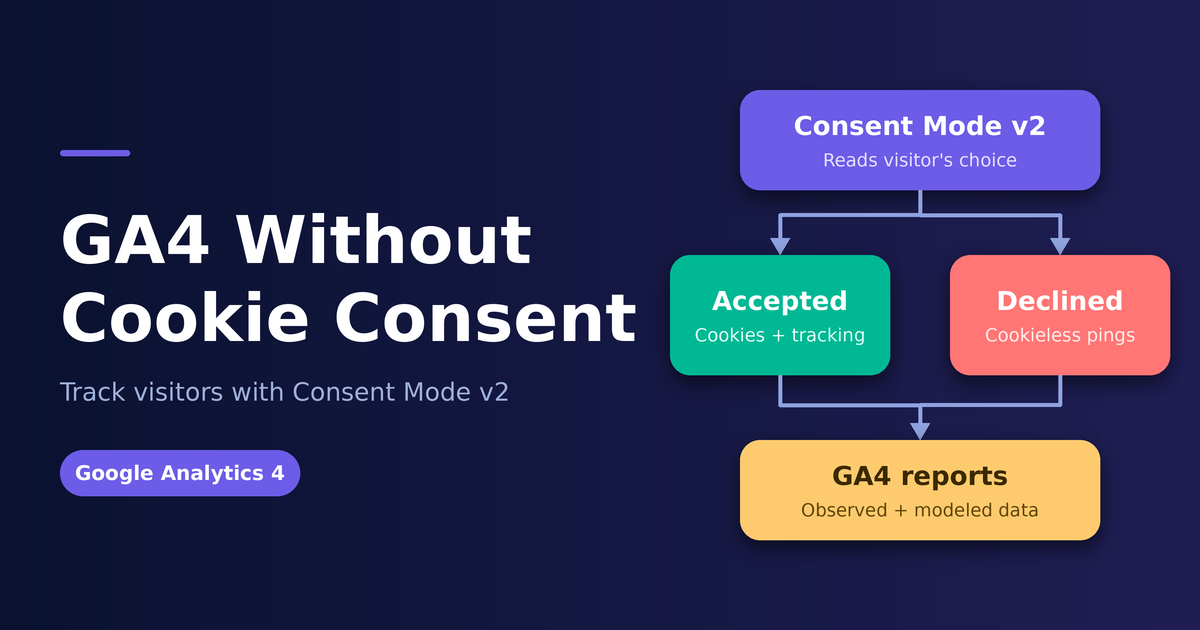
- Use GA4 consent mode in the UK with care. Consent mode passes the visitor’s choice to Google’s tags. It does not decide whether you are allowed to use those tags. You still need a way to ask for the choice.
- Use a different analytics tool. Some tools are built to work only for you and to collect combined statistics. Read each company’s data terms before you choose one. The ICO does not approve any product. Our web analytics tools guide can help you compare options.
| Your situation | Sensible choice |
|---|---|
| You use Google Ads or remarketing | Ask for consent before GA4 loads |
| You use GA4 audiences or User-ID | Ask for consent before GA4 loads |
| You want no banner and only need basic reports | Use a tool built for the exception, and read its terms |
| You want GA4 without cookie consent and no banner | Set GA4 up as shown above, take legal advice, and accept the risk |
Frequently Asked Questions
Is GA4 without cookie consent allowed in the UK?
Treat a normal GA4 setup as needing consent. A carefully locked-down setup might fit the exception, but the rules are not clear for Google tools. The ICO does not name any tool as safe.
Does GA4 need cookie consent in the UK?
Yes, by default. A normal GA4 setup should ask for consent before it loads.
Can I skip the banner if I use consent mode?
No. Consent mode only passes a choice to Google. You still need a way to ask for that choice, or you must meet the exception.
Is turning off Google signals enough?
No. It is only one step. Also check the Google Ads link, the data sharing settings and User-ID.
Does this rule apply to visitors from other countries?
This is a UK rule. Other countries have their own rules. Get advice if many of your visitors come from abroad.
Do I still need to tell visitors if I use the exception?
Yes. You must tell them what you do, and you must give them a simple, free way to object.
How do I turn off Google signals in GA4?
Google says you can do this in Admin, under Data collection. Follow Google’s steps for Google signals, then check the other settings in the list above.
Sources and Further Reading
- ICO guidance on storage and access technologies
- Google: Activate Google signals
- Google: Data sharing settings
- Google: GA4 cookie usage
- Google feature brief: control how data is used in Google Analytics
- Osborne Clarke: new exceptions explained
- Womble Bond Dickinson: new exceptions for non-intrusive cookies (via Mondaq)
- Hunton: summary of the ICO guidance
- ZwillGen: ICO cookie crackdown 2.0
- Privado: ICO finalises tracking technologies guidance
- Clickport, Trust Your Website, ConsentPixel, CookieConfirm and Cookie Consent Hub
- Related on Linkvexa: ICO Cookie Guidance 2026, Analytics Without a Cookie Banner in the UK, Google Analytics GA4 Guide for Beginners
Several sources above were read as summaries, and some are written by companies that sell consent or analytics tools. Check the ICO guidance and Google’s current terms before you rely on any detail. This article is general information, not legal advice. Rules and Google settings change, so get professional advice if your case is complex.